
2019-8-29 seo達人
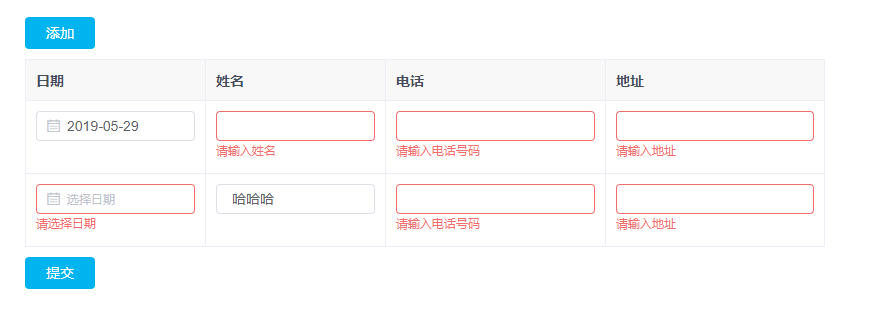
<div class="table_box">
  <el-button type="primary" class="submit_btn" @click="addTable">添加</el-button> <!-- 如果不想展示錯誤提示信息,可以加上show-message參數(shù) --> <el-form :model="productRuleForm" ref="productRuleForm" :rules="productRuleForm.rules" :show-message="false">
    <el-table
      :data="productRuleForm.tableData" border
      style="width: 100%">
      <el-table-column
        prop="date" label="日期" width="180">
        <template slot-scope="scope"> <!-- prop的規(guī)則: 在普通的form表單中是一個對象,prop是對象的屬性. 表格是由多個對象組成的數(shù)組,在寫prop是需要根據(jù)索引給值.這里的tableData就相當于對象的屬性 !-->
        <!-- rules也要單獨給 --> <el-form-item :prop="'tableData.' + scope.$index + '.date'"
            :rules='productRuleForm.rules.date'>
            <el-date-picker
              v-model="scope.row.date" value-format="yyyy-MM-dd" placeholder="選擇日期">
            </el-date-picker>
          </el-form-item>
        </template>
      </el-table-column>
      <el-table-column
        prop="name" label="姓名" width="180">
        <template slot-scope="scope">
          <el-form-item
            :prop="'tableData.' + scope.$index + '.name'" :rules='productRuleForm.rules.name'>
            <el-input v-model="scope.row.name"></el-input>
          </el-form-item>
        </template>
      </el-table-column>
      <el-table-column
        prop="phone" label="電話">
        <template slot-scope="scope">
          <el-form-item
            :prop="'tableData.' + scope.$index + '.phone'" :rules='productRuleForm.rules.phone'>
            <el-input v-model="scope.row.phone"></el-input>
          </el-form-item>
        </template>
      </el-table-column>
      <el-table-column
        prop="address" label="地址">
        <template slot-scope="scope">
          <el-form-item
            :prop="'tableData.' + scope.$index + '.address'" :rules='productRuleForm.rules.address'>
            <el-input v-model="scope.row.address"></el-input>
          </el-form-item>
        </template>
      </el-table-column>
    </el-table>
  </el-form>
  <el-button type="primary" class="submit_btn" @click="submit">提交</el-button>
</div>
js:
data () { return { productRuleForm: { tableData: [{ date: '', name: '', phone: '', address: '' }], rules: { date: [{ required: true, message: '請選擇日期', trigger: 'change' }], name: [{ required: true, message: '請輸入姓名', trigger: 'blur' }], phone: [{ required: true, message: '請輸入電話號碼', trigger: 'blur' }], address: [{ required: true, message: '請輸入地址', trigger: 'blur' }] } } } }, methods: { // 添加一行 addTable () { this.productRuleForm.tableData.push({ date: '', name: '', phone: '', address: '' }) }, // 提交數(shù)據(jù) submit () { this.$refs['productRuleForm'].validate((valid) => { if (valid) { } }) }}
藍藍設計( www.xintaizi.com )是一家專注而深入的界面設計公司,為期望卓越的國內(nèi)外企業(yè)提供卓越的UI界面設計、BS界面設計 、 cs界面設計 、 ipad界面設計 、 包裝設計 、 圖標定制 、 用戶體驗 、交互設計、 網(wǎng)站建設 、平面設計服務。