
2020-4-28 seo達人
本文旨在通過一個簡單的例子,練習vuex的幾個常用方法,使初學者以最快的速度跑起來一個vue + vuex的示例。
學習vuex需要你知道vue的一些基礎知識和用法。相信點開本文的同學都具備這個基礎。
另外對vuex已經比較熟悉的大佬可以忽略本文。
基于vue-cli腳手架生成一個vue項目
常用npm命令:
npm i vue-vli -g vue --version vue init webpack 項目名 進入項目目錄,使用npm run dev先試著跑一下。
一般不會出現問題,試跑成功后,就可以寫我們的vuex程序了。
使用vuex首先得安裝vuex,命令:
npm i vuex --save介紹一下我們的超簡單Demo,一個父組件,一個子組件,父組件有一個數據,子組件有一個數據,想要將這兩個數據都放置到vuex的state中,然后父組件可以修改自己的和子組件的數據。子組件可以修改父組件和自己的數據。
先放效果圖,初始化效果如下:

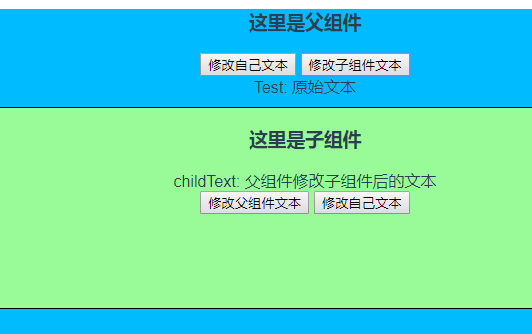
如果想通過父組件觸發子組件的數據,就點“改變子組件文本”按鈕,點擊后效果如下:
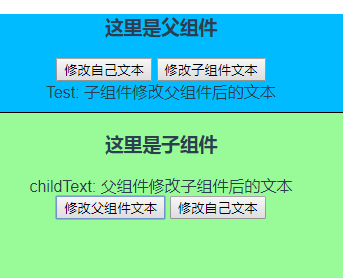
如果想通過子組件修改父組件的數據,就在子組件點擊“修改父組件文本”按鈕,點擊后效果如下:
首先是Parent.vue組件
<template> <div class="parent"> <h3>這里是父組件</h3> <button type="button" @click="clickHandler">修改自己文本</button> <button type="button" @click="clickHandler2">修改子組件文本</button> <div>Test: {{msg}}</div> <child></child> </div> </template> <script> import store from '../vuex' import Child from './Child.vue' export default { computed: {
            msg(){ return store.state.testMsg;
            }
        }, methods:{
            clickHandler(){
                store.commit('changeTestMsg', '父組件修改自己后的文本')
            },
            clickHandler2(){
                store.commit('changeChildText', '父組件修改子組件后的文本')
            }
        }, components:{ 'child': Child
        },
        store,
    } </script> <style scoped> .parent{ background-color: #00BBFF; height: 400px;
    } </style>
下面是Child.vue子組件
<template> <div class="child"> <h3>這里是子組件</h3> <div>childText: {{msg}}</div> <button type="button" @click="clickHandler">修改父組件文本</button> <button type="button" @click="clickHandler2">修改自己文本</button> </div> </template> <script> import store from '../vuex' export default { name: "Child", computed:{
            msg(){ return store.state.childText;
            }
        }, methods: {
            clickHandler(){
                store.commit("changeTestMsg", "子組件修改父組件后的文本");
            },
            clickHandler2(){
                store.commit("changeChildText", "子組件修改自己后的文本");
            }
        },
        store
    } </script> <style scoped> .child{ background-color: palegreen; border:1px solid black; height:200px; margin:10px;
    } </style>
最后是vuex的配置文件
 import Vue from 'vue' import Vuex from 'vuex';

Vue.use(Vuex) const state = { testMsg: '原始文本', childText:"子組件原始文本" } const mutations = {
    changeTestMsg(state, str){
        state.testMsg = str;
    },
    changeChildText(state, str){
        state.childText = str;
    }

} const store = new Vuex.Store({ state: state, mutations: mutations
}) export default store;通過該vuex示例,了解vuex的常用配置及方法調用。希望對不怎么熟悉vuex的同學快速上手vuex項目有點幫助。
因為沒太多東西,我自己也是剛接觸,本例就不往GitHub扔了,如果嘗試了本例,但是沒有跑起來的同學,可以一起交流下。