2021-7-23 前端達人
本篇博客所用到的技術也是從別的博客學習到的,但目前找不到那篇博客的鏈接了。
var tabSize = tabSize || {}; tabSize.init = function (id) { //用來存儲當前更改寬度的Table Cell,避免快速移動鼠標的問題 var tTD; // 獲取需要修改列寬的表格 var table = document.getElementById(id); var headTh = table.rows[0]; for (j = 0; j < headTh.cells.length; j++) { headTh.cells[j].onmousedown = function () { //記錄單元格 tTD = this; if (event.offsetX > tTD.offsetWidth - 10) { tTD.mouseDown = true; tTD.oldX = event.x; tTD.oldWidth = tTD.offsetWidth; } }; headTh.cells[j].onmouseup = function () { //結束寬度調整 if (tTD == undefined) tTD = this; tTD.mouseDown = false; tTD.style.cursor = 'default'; }; headTh.cells[j].onmousemove = function () { //更改鼠標樣式 if (event.offsetX > this.offsetWidth - 10) this.style.cursor = 'col-resize'; else this.style.cursor = 'default'; //取出暫存的Table Cell if (tTD == undefined) tTD = this; //調整寬度 if (tTD.mouseDown != null && tTD.mouseDown == true) { tTD.style.cursor = 'default'; if (tTD.oldWidth + (event.x - tTD.oldX) > 0) tTD.width = tTD.oldWidth + (event.x - tTD.oldX); //調整列寬 tTD.style.width = tTD.width + 'px'; tTD.style.cursor = 'col-resize'; // 調整滾動表格的每個cell for (k = 0; k < table.rows.length; k++) { table.rows[k].cells[tTD.cellIndex].style.width = tTD.style.width; } } }; } }; // 調用 // 鼠標拖動列寬 setTimeout(function () { // 1.html代碼里就是一個普通的table元素 // 2.傳入table元素的id tabSize.init('documentList'); }, 600);
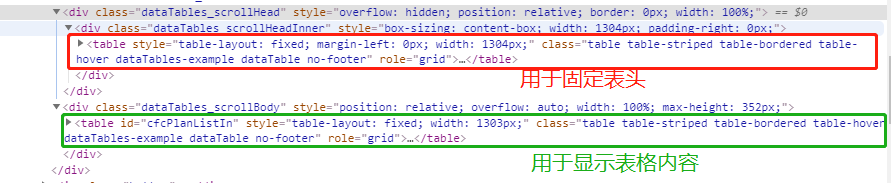
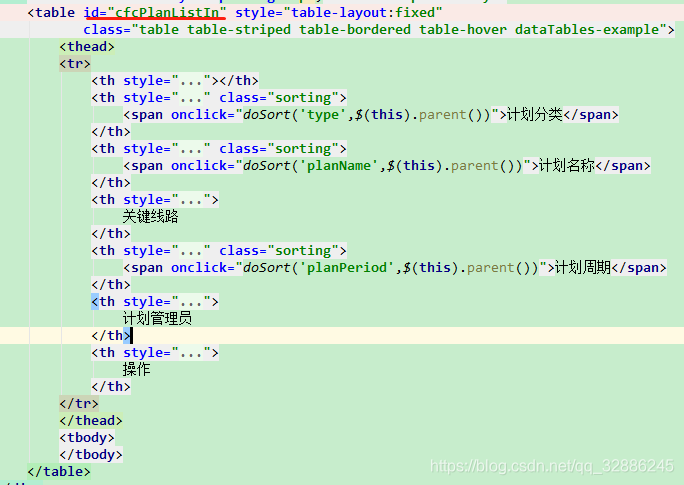
var tabSize = tabSize || {}; tabSize.init = function (id,headTableWrapperId) { //用來存儲當前更改寬度的Table Cell,避免快速移動鼠標的問題 var tTD; // 獲取需要修改列寬的表格 var table = document.getElementById(id); // 獲取固定頭部的表格 var tableHead = $('#'+ headTableWrapperId + ' .dataTables_scrollHeadInner table')[0]; // 獲取表格頭部th var headTh = tableHead.rows[0]; for (j = 0; j < headTh.cells.length; j++) { headTh.cells[j].onmousedown = function () { //記錄單元格 tTD = this; if (event.offsetX > tTD.offsetWidth - 10) { tTD.mouseDown = true; tTD.oldX = event.x; tTD.oldWidth = tTD.offsetWidth; } }; headTh.cells[j].onmouseup = function () { //結束寬度調整 if (tTD == undefined) tTD = this; tTD.mouseDown = false; tTD.style.cursor = 'default'; }; headTh.cells[j].onmousemove = function () { //更改鼠標樣式 if (event.offsetX > this.offsetWidth - 10) this.style.cursor = 'col-resize'; else this.style.cursor = 'default'; //取出暫存的Table Cell if (tTD == undefined) tTD = this; //調整寬度 if (tTD.mouseDown != null && tTD.mouseDown == true) { tTD.style.cursor = 'default'; if (tTD.oldWidth + (event.x - tTD.oldX) > 0) tTD.width = tTD.oldWidth + (event.x - tTD.oldX); //調整列寬 tTD.style.width = tTD.width + 'px'; tTD.style.cursor = 'col-resize'; // 調整滾動表格的每個cell for (k = 0; k < table.rows.length; k++) { table.rows[k].cells[tTD.cellIndex].style.width = tTD.style.width; } } }; } }; // 鼠標拖動列寬 setTimeout(function () { // 參數:1.table元素的id, // 2.datatable插件生成的最外層div的id,F12可查看到 tabSize.init('cfcPlanListIn','cfcPlanListIn_wrapper'); }, 2000);
藍藍設計建立了UI設計分享群,每天會分享國內外的一些優秀設計,如果有興趣的話,可以進入一起成長學習,請掃碼藍小助,報下信息,藍小助會請您入群。歡迎您加入噢~~希望得到建議咨詢、商務合作,也請與我們聯系。
分享此文一切功德,皆悉回向給文章原作者及眾讀者. 免責聲明:藍藍設計尊重原作者,文章的版權歸原作者。如涉及版權問題,請及時與我們取得聯系,我們立即更正或刪除。
藍藍設計( www.xintaizi.com )是一家專注而深入的界面設計公司,為期望卓越的國內外企業提供卓越的UI界面設計、BS界面設計 、 cs界面設計 、 ipad界面設計 、 包裝設計 、 圖標定制 、 用戶體驗 、交互設計、 網站建設 、平面設計服務
藍藍設計的小編 http://www.xintaizi.com